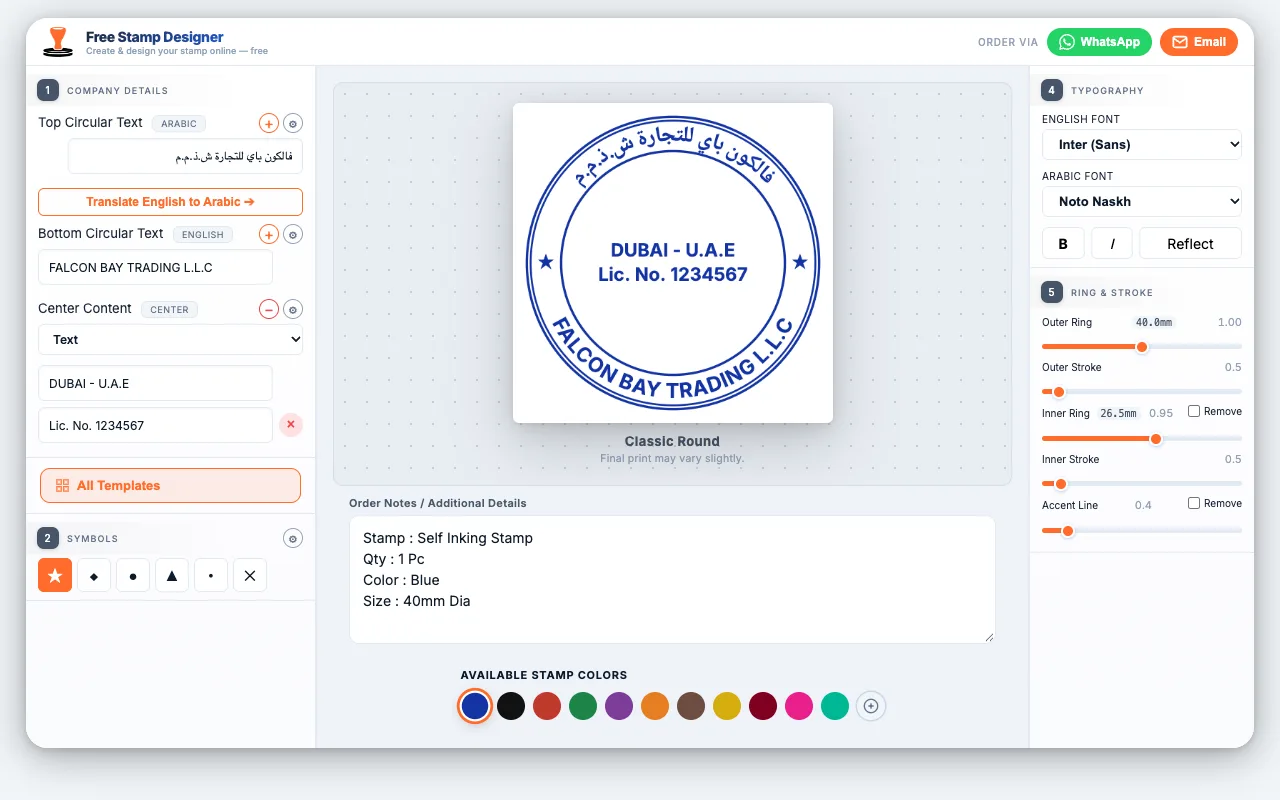
To design your own rubber stamp for a UAE company, use your trade name exactly as it appears on your trade licence — in Arabic and English — pick a shape and size that fits that text (a 40mm round or a 50 × 30mm oval suits most companies), keep any logo simple and single-colour, and check the proof before production. You can do all of this free in our online stamp designer and order the finished self-inking stamp from AED 80.
This guide walks through each design decision, shows real layouts made in the designer, and lists the mistakes that most often get a company stamp questioned by banks, free zones and government offices.
What Should a UAE Company Stamp Include?
Most licensing authorities expect the same core details. DMCC's official company stamp guidelines, for example, require the company name exactly as licensed and treat the address, phone number and P.O. Box as optional. Mainland companies follow the same logic: the stamp identifies the legal entity, so the name is what matters most.
| Element | Needed? | Design tip |
|---|---|---|
| Company name in English | Yes | Exactly as on the licence, including L.L.C, FZE, FZ-LLC or "Branch" |
| Company name in Arabic | Usually | Copy the Arabic trade name printed on your licence — never a machine translation |
| City and country | Common | "Dubai – U.A.E." usually sits in the centre of a round stamp |
| Trade licence number | Optional | Useful for banks and suppliers; double-check every digit |
| Logo | Optional | Solid shapes only — see the logo section below |
| P.O. Box, phone, TRN | Optional | Every extra line makes all the text smaller |
Rules differ between free zones and mainland authorities, and some regulated activities may need an extra reference number. If your licensing authority has issued stamp guidelines, follow those first. Our guide to legal requirements for company stamps in the UAE covers this in more detail.
Which Shape and Size Should You Choose?
The amount of text decides the size, not the other way round. A short name looks bold and clear on a 40mm round stamp; a long name with "General Trading L.L.C" squeezed around the same ring becomes thin and hard to read. These are the sizes we make most often:
| Shape & size | Best for | Text capacity |
|---|---|---|
| Round 40mm | The standard company stamp | Name in both languages around the ring, 2–3 centre lines |
| Round 30mm | Short names, small documents | Name around the ring, 1 centre line |
| Oval 50 × 30mm | Long company names | More room on the ring, 2 centre lines |
| Rectangle 50 × 30mm | Clear, straight-line text | Arabic line, English line, details line |
| Rectangle from 14 × 36mm | Address or "for and on behalf of" stamps | 1–3 short lines |
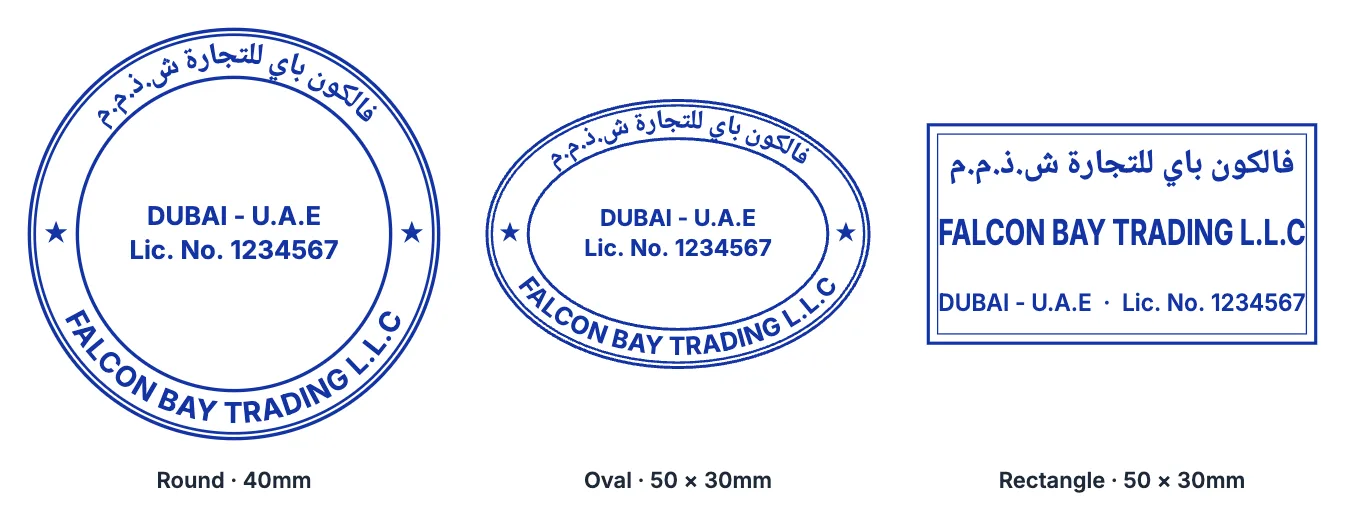
Notice how the rectangle fits the full name on one line in larger letters, while the round stamp bends it around the ring. If your English name looks squeezed on the round preview, switch to the oval or move part of the name to a second ring line — the designer lets you add one. For more on dimensions and mechanisms, see our company stamp size guide.
How to Lay Out Arabic and English Text
A bilingual stamp has to read correctly in both directions. The layouts that work best in the UAE are:
- Round and oval stamps: Arabic on the top arc, English on the bottom arc, and the city or licence number in the centre. Both arcs read upright, so nobody has to turn the paper.
- Rectangular stamps: Arabic on the first line, English on the second, and details on the third.
The most common problem is Arabic that has been typed into ordinary design software: the letters come out disconnected or in reverse order, and the stamp is unusable. Our designer joins Arabic letters properly and runs them right to left, so what you see on screen is what gets engraved.
There is a Translate English to Arabic button to give you a starting point, but treat it as a draft. Your Arabic trade name is a registered name, and it often differs from a literal translation. Copy it from your trade licence letter by letter.
For fonts, clear Naskh styles such as Noto Naskh or Amiri are the safest choice for official stamps. Decorative Arabic fonts like Qahiri look striking on branding stamps but can be hard to read at 40mm.
How to Add a Logo Without Losing Detail
A stamp prints in a single ink colour, and the impression is small. That changes what a logo can do:
- No gradients, shadows or photos. They cannot be reproduced in one solid colour; they turn into dark blotches.
- Thicken thin lines. Hairlines that look fine on a website often break up or vanish in rubber.
- Drop small text inside the logo. Taglines inside an emblem become unreadable at stamp size.
- Send a sharp file. A vector file (AI, SVG or PDF) or a high-resolution PNG gives clean edges. A screenshot or a photo forwarded on WhatsApp gives jagged ones.
In the designer, set Center Content to Logo or Logo + Text and upload your file to see how it sits inside the ring. If the logo needs simplifying, our team adjusts it as part of the free design proof.
How to Design Your Stamp in Our Free Online Designer
The free stamp designer runs in your browser on a phone or computer, with no sign-up. Here is the full process:
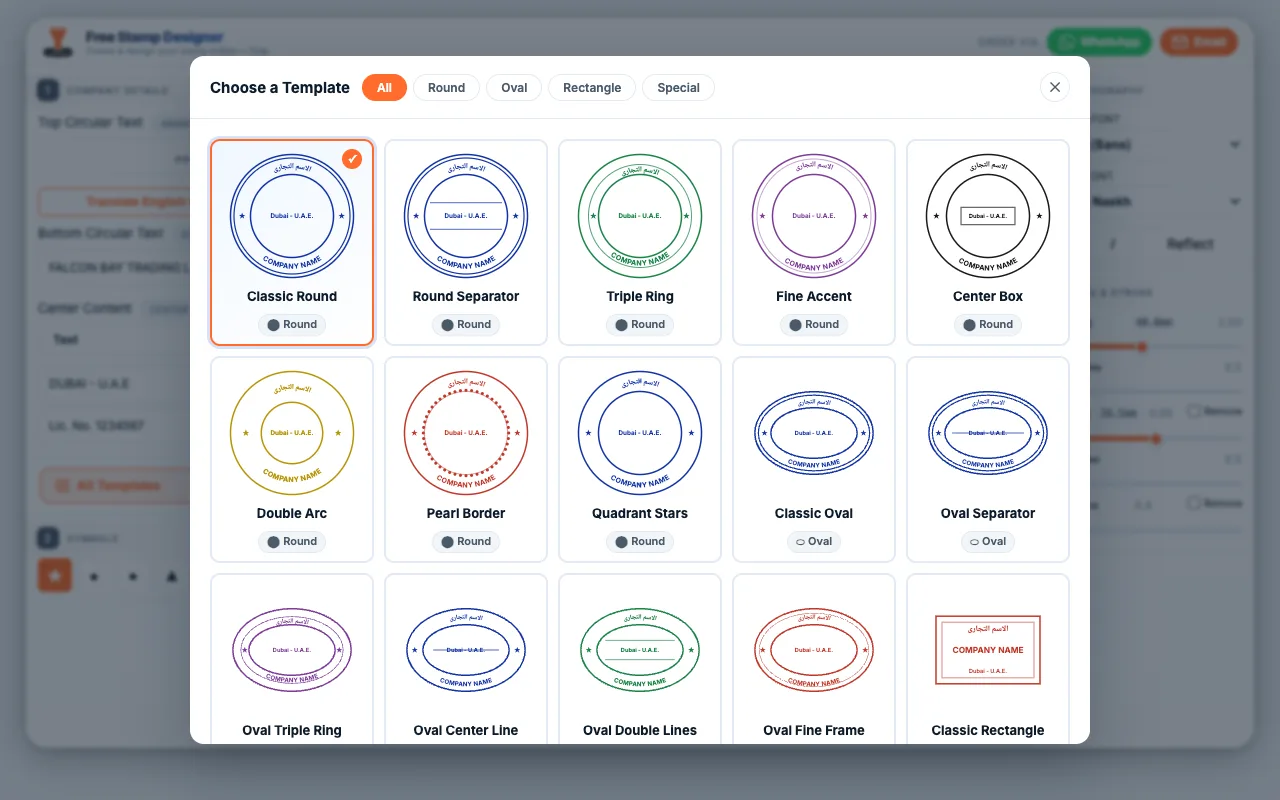
- Choose a template. There are 20 to start from: round, oval, rectangle, and ready-made PAID, RECEIVED and CANCELLED stamps.
- Enter your text. Type the Arabic name in Top Circular Text, the English name in Bottom Circular Text, and city or licence number under Center Content. The preview updates as you type.
- Fine-tune the look. Choose from 12 English and 11 Arabic fonts, switch bold or italic on and off, and adjust ring sizes and line thickness. The outer ring shows its size in millimetres, so you know how the stamp will print.
- Pick an ink colour. There are 11 colours plus a custom option. Blue is the usual choice for official company stamps because it shows clearly that a document carries an original impression.
- Add order notes. Note the stamp type (self-inking, pocket or manual), the quantity and anything else we should know.
- Send the order on WhatsApp or by email. Add your name and mobile number, and attach your trade licence and Emirates ID if you have them to hand. You can also send them later.
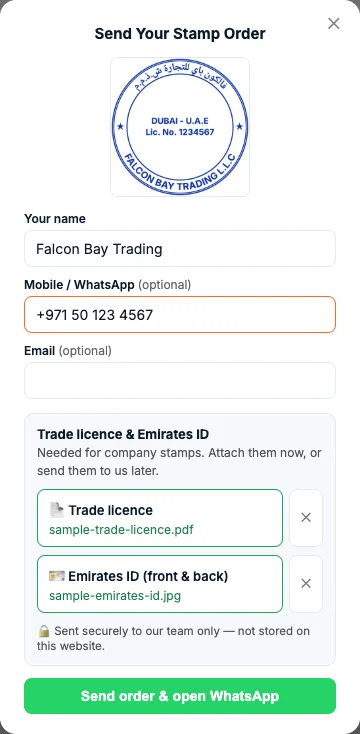
When you send the order, we receive a print-ready vector file of exactly the design you approved on screen, together with your documents. Nobody retypes your company name, which removes the most common source of errors.
Design Your Company Stamp Free
Try your name in Arabic and English, compare round, oval and rectangle layouts, and send the design straight to our team. Self-inking company stamps from AED 80.
🖊️ Open the Free Stamp DesignerMistakes That Get Company Stamps Questioned
These are the problems we correct most often at the proof stage:
| Mistake | What can happen | How to avoid it |
|---|---|---|
| Name missing "L.L.C", "FZE" or "Branch", or spelled differently | Banks and authorities may not accept stamped documents | Copy the name from the licence exactly |
| Arabic name machine-translated | The Arabic does not match your registered trade name | Use the Arabic printed on the licence |
| Too much text for the size | Tiny letters that fill with ink and smudge | Remove optional lines or choose a larger size |
| Low-resolution logo | Blurred, jagged edges in every impression | Send a vector file or a high-resolution PNG |
| Decorative fonts on an official stamp | Name hard to read when checked against the licence | Keep clear fonts for company stamps |
From Design to Finished Stamp
Once your design reaches us, we send a free design proof before anything is made. Check every letter, number and Arabic character on it. Once production starts, the text is fixed in the rubber.
Most standard orders are ready in 24–48 hours, and same-day production is available for simple designs ordered before noon. You can collect from our shop in Al Barsha 1 or have the stamp delivered anywhere in the UAE.
As for which type to order: a self-inking company stamp (from AED 80) suits daily office use, a pocket stamp (from AED 85) suits staff who work on the move, and a manual rubber stamp (from AED 80) lets you switch ink colours with separate pads. You can compare them all on our company stamp page.
Designing your own rubber stamp takes a few minutes when you start from the details on your trade licence: get the name right in both languages, match the size to the text, keep the logo simple and approve the proof.
FAQ: Designing Your Own Company Stamp
Can I design my own company stamp for free?
Yes. Our free online stamp designer lets you type your company name in Arabic and English, choose from 20 templates, add a logo and preview the result. You only pay when you order the physical stamp, from AED 80 for a self-inking company stamp.
What size is a standard company stamp in the UAE?
A 40mm round stamp is the most common company stamp. Companies with long names often choose a 50 × 30mm oval or rectangle, and 30mm round stamps suit short names.
Does a UAE company stamp need Arabic?
Most licensing authorities expect the company name in both Arabic and English, exactly as it appears on the trade licence. Requirements vary between free zones and mainland authorities, so follow your authority's stamp guidelines if it has issued them.
Can I put my logo on a company stamp?
Yes, as long as it works in one solid colour. Remove gradients, shadows and small text, thicken thin lines, and send a vector file (AI, SVG or PDF) or a high-resolution PNG.
How long does it take to make a company stamp in Dubai?
Most standard orders are ready in 24–48 hours. Same-day production is available for simple designs ordered before noon, after you approve the free design proof.
Ready to Order Your Company Stamp?
Send us your design or just your trade licence on WhatsApp, and we will prepare the proof for you. Visit us at Al Attar Business Center, Shop 10, Al Barsha 1, Dubai.
💬 WhatsApp +971 50 670 6635